Form Field Extraction From Structured PDF Forms
CommonForms dataset now benchmarks form field detection against vendor claims.

Form extraction means working out where data goes on a document before it is completed: empty text spaces, check options, radio choices, signature areas, and table entries, each marked by type and place. That's a different task from taking text from a page or extracting values from a form that's already filled in, and confusing them is where many document pipelines break down before they begin.
A few related tasks keep getting merged, but they belong apart. Optical character recognition pulls text off a page by converting pixels to letters. Data extraction, sometimes called key information extraction, pulls values out of a form that's already been filled in. Form field detection comes first, before any of that matters: it finds and classifies blank input areas. When a pipeline skips field detection, it puts fields in the wrong spots, loses checkboxes outright, and leaves all the correction for whoever's reviewing by eye.
CommonForms (2509.16506) treats this as a task in two parts. First, identify each field's position and kind. Then, tie fields to their labels in a semantically usable way, so the field zone reads as "date of birth", not just a box with coordinates. This post covers the first part, because that's where most of the hard choices and bugs show up.
The two PDF types that determine which extraction path is possible
Every form field extraction begins with a choice determined by the file.
Fillable PDFs, called AcroForm PDFs or interactive PDFs, keep form fields built into the file in a structured way. Tap one and the cursor shifts because an input object sits beneath it. Since field labels and saved values are already machine-readable, extracting them feels like pulling from a spreadsheet instead of parsing an image. Using Tools > Prepare Form > Export Data, Adobe Acrobat can export the data, spitting FDF, XFDF, XML, or text.
Flat PDFs, also called informal or scanned PDFs, are just a page image. Press the page and it does not respond, because no interactive object is present. Handwritten answers and typed responses blend into the form's printed lines as plain pixels, impossible to tell apart until software reads the layout. Pulling field data from one requires OCR and layout parsing before field detection is even possible. This path is tougher to pull off yet more common, since most older document backlogs hold flat scans rather than tidy AcroForms, making the work commercially worth more.
Practitioners pick the wrong tool most often because both file kinds show up the same way on screen. PrizmDoc is designed for AcroForm input, and its performance on page-only PDFs may vary. Adobe Acrobat Sign's built-in detection stops working past 25 pages. Tools built around flat-PDF usually manage AcroForms as well, because detecting fields through pixels is the more challenging task, but the opposite doesn't hold. The first decision shaping everything after it is picking the file type that runs the real workload, not the demo.
How detection engines locate and classify fields in a flat document
Detection engines scan flat PDFs through layout cues like a quick glance over any printed form: a mark after a label, a box by "yes," rows meant to be filled. Spacing, borders, and where lines sit on the page all matter before any character is read.
Any real detection tool must cover three field-type groups. Text inputs can be multi-line or single-line, even when an answer spills over several lines. Choice buttons, including radio buttons and checkboxes, need a selection-mark detector to spot a filled one from a blank, since regular text recognition won't work. Signature fields match blank text boxes visually, yet they hold a different semantic role and typically need to be flagged on their own.
What comes back is structured, often JSON, with a field type, a confidence score, and bounding box coordinates for each field. Then software forms pairs from labels to zones: the nearest label to a field becomes its key, and each field zone becomes the matching placeholder. When labels stay the same and sit near their fields, this runs cleanly. When they aren't, the pipeline needs normalization logic to match each label to its box.
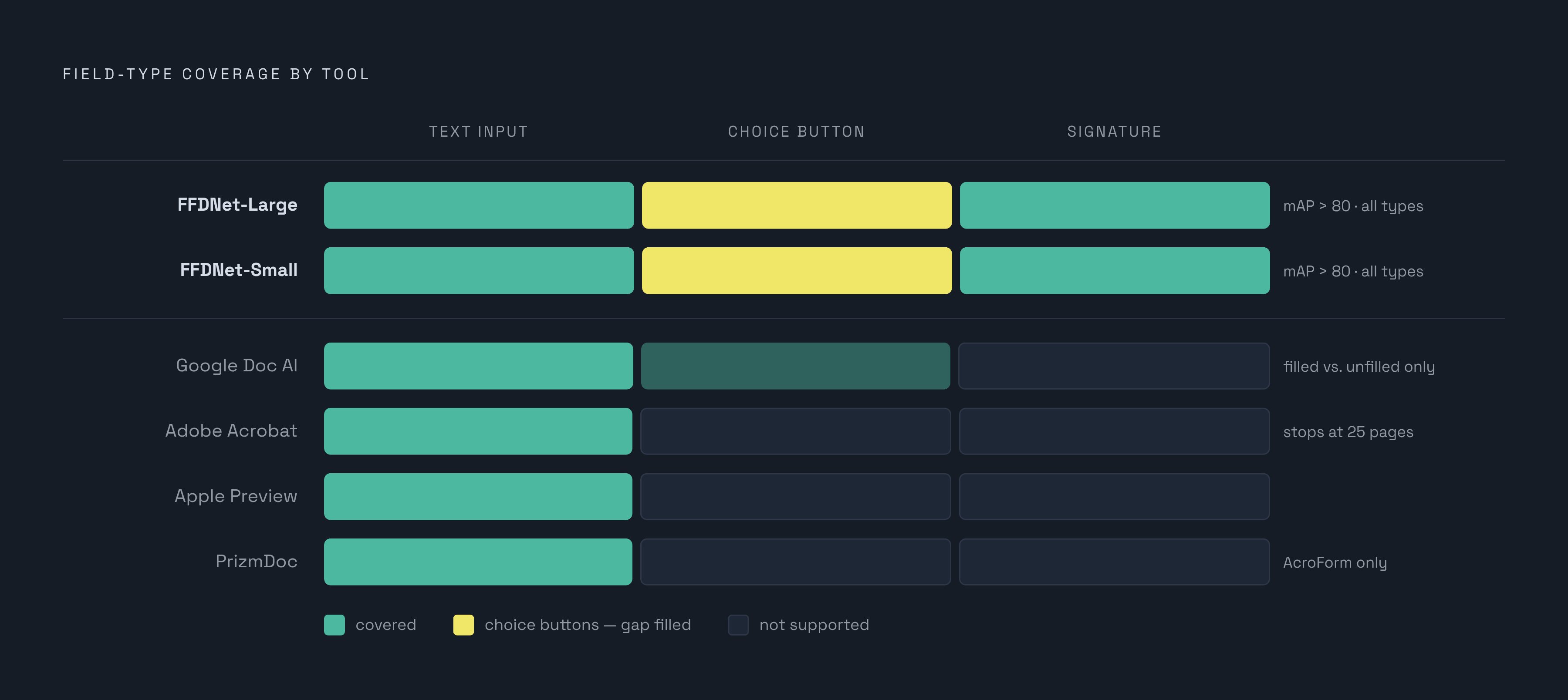
Checkbox detection is what really divides these tools. The CommonForms paper said commercially sold tools such as Apple Preview and Adobe Acrobat handled only text form fields then and could not predict choice buttons. FFDNet, a model built for the CommonForms dataset, includes choice button prediction among its main contributions, highlighting how underserved that field type remains.
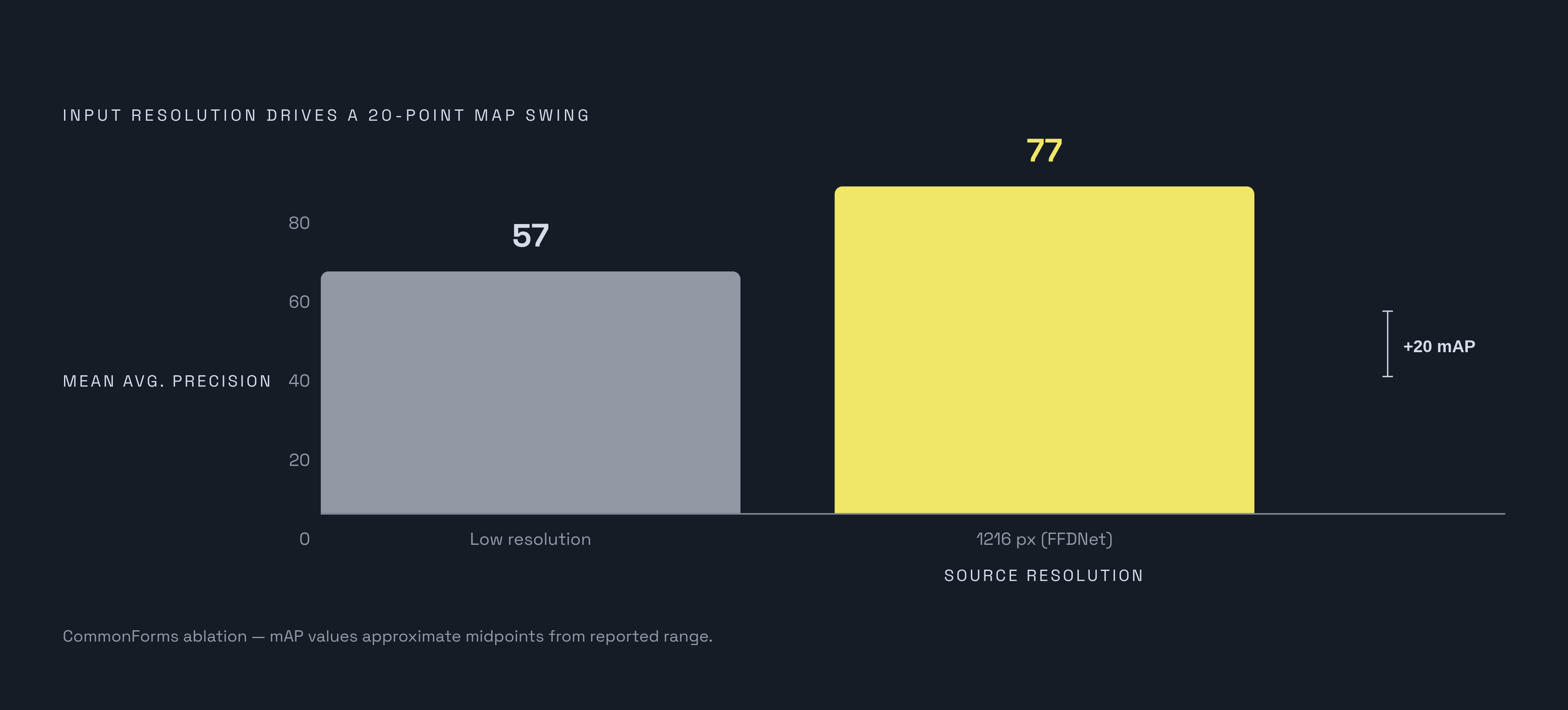
Resolution makes a large difference in results: the CommonForms paper's ablation results show roughly a 20-point swing in mean average precision across models trained at different input resolutions, a large gap for what sounds like a minor preprocessing choice. According to the CommonForms paper's ablation results, roughly a 20-point swing in mean average precision shows up across models trained at different input resolutions, a large gap for what sounds like a small preprocessing choice. FFDNet works from 1216-pixel sharp source files by design, since field-finding depends heavily on picture clarity, above all for tiny tick boxes. Tables form a separate layout category, where every box is modeled as its own field zone. Layout parsers still struggle most with nested tables and layouts that use multiple columns, flat PDF or not.
The CommonForms dataset and the field's maturity in public benchmarking
The field didn't have a single yardstick until CommonForms. The study (2509.16506) says the field had no big common test set or free code made for form work, so companies had no common way to test results.
CommonForms approaches it like object detection: feed it a page image, predict bounding boxes, and tag each as Text Input, Choice Button, or Signature. Its dataset was filtered from a larger collection into roughly 55,000 documents spanning over 450,000 pages. About one-third of those pages are non-English. The dataset spans 14 classified domains, and no single domain makes up more than a quarter of the total, which keeps it from skewing toward, say, tax forms or medical intake sheets alone. On Hugging Face sits a validation subset of 10,000 annotated document pages for those who want to check against it.
On this dataset, models trained were FFDNet-Small plus FFDNet-Large; each used below $500 in compute and both hit average precision above 80 on CommonForms. In a qualitative look at Adobe Acrobat, FFDNet beat its precision and recall, plus it handled predicting choice buttons, which Acrobat never tries.
What this means in practice: there's now a public benchmark against which the "no templates required, works instantly" pitch common to commercial vendors can actually be tested. This really changes an area long reliant on stats from the companies selling it. No public benchmark yet covers form enrichment: linking fields to their labels by meaning. CommonForms handles detection effectively. It still doesn't include the stage where a picked-out box becomes a field a later pipeline can confidently tag as "employer name".
How to evaluate commercial and cloud-based tools against each other
A tool that works great on a single-page demo form can break down as soon as it meets an intake packet of five pages with nested data and a signature area on page four. For real use, tools should be tested on each type (text, button, signature) in born-digital and image PDFs, not just the sample a seller presents. It also has to handle that same spread, from one page up to multi-page forms with odd spacing. An API, batch processing, and webhooks mean the tool can work within an automated pipeline instead of making people upload things by hand. Confidence scoring for each field shows staff which extractions need review; without it, mistakes slip through silently. In regulated fields, deployment via cloud, VPC, or on-premises and certifications like HIPAA, SOC 2, or GDPR act as gating must-haves, not optional extras.
Some specific tools illustrate how these tradeoffs show up. Extend's own documentation states that it processes long and complex forms in seconds using vision-language models and what it calls agentic OCR, handling handwriting and messy layouts, with confidence scoring, a human-in-the-loop review interface, and workflow orchestration built in. It holds SOC 2, HIPAA, plus GDPR compliant status, works across cloud, VPC, and mixed deployment setups, and is designed to handle tough documents with high accuracy.
Apryse is narrower: the Smart Data Extraction module identifies checkboxes, text inputs, and signature fields, and gives field type, confidence score, and bounding box in JSON, with everything run on local infrastructure. The module is an add-on for the SDK, built for detection over full workflow needs, fitting teams embedding it within a custom application instead of a standalone setup.
Most people with a PDF know Adobe Acrobat's field detection, which lowers the learning curve, but CommonForms says it stops at 25 pages and cannot predict choice buttons. So it's no good for high-volume tasks or a checkbox-heavy pipeline, even if the interface is easiest to use.
For field detection, BoldSign relies on Google Gemini and is built specifically around e-signature workflows, pre-filling PDFs of up to 50 pages quickly. Lido handles scanned forms and fillable ones, outputs to CSV, JSON, Excel, Google Sheets, or QuickBooks, hits above 99% field-level accuracy, and carries HIPAA compliance plus SOC 2 Type II. PrizmDoc needs AcroForm input, as mentioned, and cannot perform complete recognition of field types on scanned or flat forms, but it can extract text fields from raster scans in a restricted way.
AWS Textract, Google Cloud Document AI and Azure Document Intelligence are the cloud hyperscalers handling over 12 billion document pages every three months, so companies without their own data experts usually start there. Google Cloud Document AI handles key-value pairs and tables, and picks up checkboxes with filled-versus-unfilled typing included. For simpler use, Python tools like PyPDF2 or pdfplumber handle fillable PDFs in batch scripts, but can't read scanned forms natively without OCR added, like Tesseract bolted in, and include no review tooling or confidence scoring.
Tools designed for AcroForm input break as soon as they meet the image-only pages filling most old archives, and the ones that hold up under heavy daily loads combine field finding with trust scores and a screen to check results, not just good numbers on perfect test files.
Where form field extraction sits inside the broader intelligent document processing market
Form field extraction sits within the intelligent document processing market, a market rising sharply by any count, though analysts differ on its current size. Grand View Research estimates the IDP market will reach a multi-billion-dollar valuation in 2025, projecting nearly a tenfold rise by 2033 at a 33.8% CAGR. Polaris and Market Research Future along with Precedence Research each quote 2025 figures spanning a range of several hundred million dollars, working off different definitions. The gap points not to disagreement over expansion but to how loosely each firm defines "intelligent document processing".
Need isn’t evenly shared across sectors. According to Coherent Market Insights, BFSI will hold around a third of the 2026 IDP market, driven by compliance needs, faster onboarding, and the cost of manual errors at scale. Medicine and biology are expanding rapidly, thanks to digitization of health records and automation of coverage requests, which often involve handwritten, messy forms where errors carry high stakes.
Public sector adoption gives the most concrete real-world payoff on record. Market Research Future said AI-augmented extraction reduced U.S. queues for forms by 43% across 5 trial offices in 2024, but no checkable record such as NIST supports it, so treat it as stated, not reviewed. Even so, it's the clearest result figure going around, and it shows why rule-bound industries value trails and confidence scoring past just engineering taste: in banking and medicine, showing your steps counts as much as landing the field right at first.
Where extraction falls short and why
Paid tools miss checkboxes and radio buttons more than any other field type. This is a wider issue: The CommonForms paper notes that Adobe Acrobat does not predict choice buttons, and research indicates Apple Preview also lacks this capability. A pipeline with no checkboxes will still hit high accuracy numbers on text fields while quietly skipping every true/false choice on the page.
Bad resolution scans create mistakes that spread instead of staying put. A single OCR misread from a blurry scan wrecks more than one letter, it severs the label-to-field link everything downstream needs. The CommonForms ablation’s 20-point swing for mean average precision across resolution is an illustration of detection’s reliance on image quality rather than a marginal footnote.
Most tools degrade on Multi-page forms containing nested tables, multi-column layouts, or answers spilling across several lines. Handling answers that spill beyond a single field is a challenge for many tools, and Extend addresses this in its workflow. Handwritten input makes things tougher, calling for handwriting recognition and spatial judgment about where the writing sits next to its label, which most tools built around templates weren't made to do.
Label ambiguity messes up naive key-value links differently. Forms where a label sits far from its corresponding field, or where several labels crowd around one field zone, defeat any system relying on "nearest text equals the key" logic. Also, flattened PDFs erase the layout that tools built around a common form-field rely on. This happens when someone has printed and rescanned a fillable form that's interactive, or when those fields get merged into a flat image. After flattening, a form must be handled as a flat scan, whatever it once was, no exceptions.
Missing confidence scoring could be the quietest way things go wrong. Without per-field confidence, nothing marks which extractions need checking, so errors pass into the app that sits downstream and stay unnoticed until a person catches a wrong entry.
A gap remains that vendors still haven't filled. Research from JPMorgan Chase's Artificial Intelligence Research, in TreeForm (2402.05282), says today's form labels miss important nested order. A field detector can hit a high score on detection and still not capture semantic groupings, the fields that connect, the area a checkbox modifies, which make the extracted data usable once it reaches another platform.
Choosing the right approach given your form type, volume, and infrastructure constraints
The first decision is the same each time: AcroForm or flat scan? That one detail determines the tools even available, and skipping it leaves teams stuck with software that can't process half their real document queue.
After that, volume and difficulty guide the choice. A few fillable forms only need Acrobat's export or a short PyPDF2 Python job, so nobody should buy anything else. Cloud APIs like Textract, Document Intelligence, and Google Cloud Document AI work great for varied document sets at medium scale, charging per use with no initial license cost. Large volume tasks with hard layouts and compliance obligations need production-grade tools offering a review interface, confidence scoring, and approved deployment; Lido and Extend fit here, both with proven compliance credentials. For groups putting extraction inside their own app, Apryse's local SDK fits that exact setup. Teams focused on an e-signature pipeline specifically get BoldSign's Gemini-based detection, purpose-built for that workflow.
Before committing to any vendor, do one check: get per-field confidence numbers for the messiest forms in the queue, not the vendor's polished demo. That's what separates a tool that holds up in a demo from one that keeps going when 2 a.m. hits on a Friday and scanned intake forms need to be ready before Monday.
Since CommonForms (2509.16506) is out as an open test set, nobody has to just believe a seller's performance numbers at face. It's reasonable to check if a vendor's model was run on that dataset, and before this benchmark, the field didn't know how to raise it.