Document Image Resolution Thresholds for Reliable OCR
Set your scanner to 300 DPI minimum, or OCR will fail no matter how smart your software is.
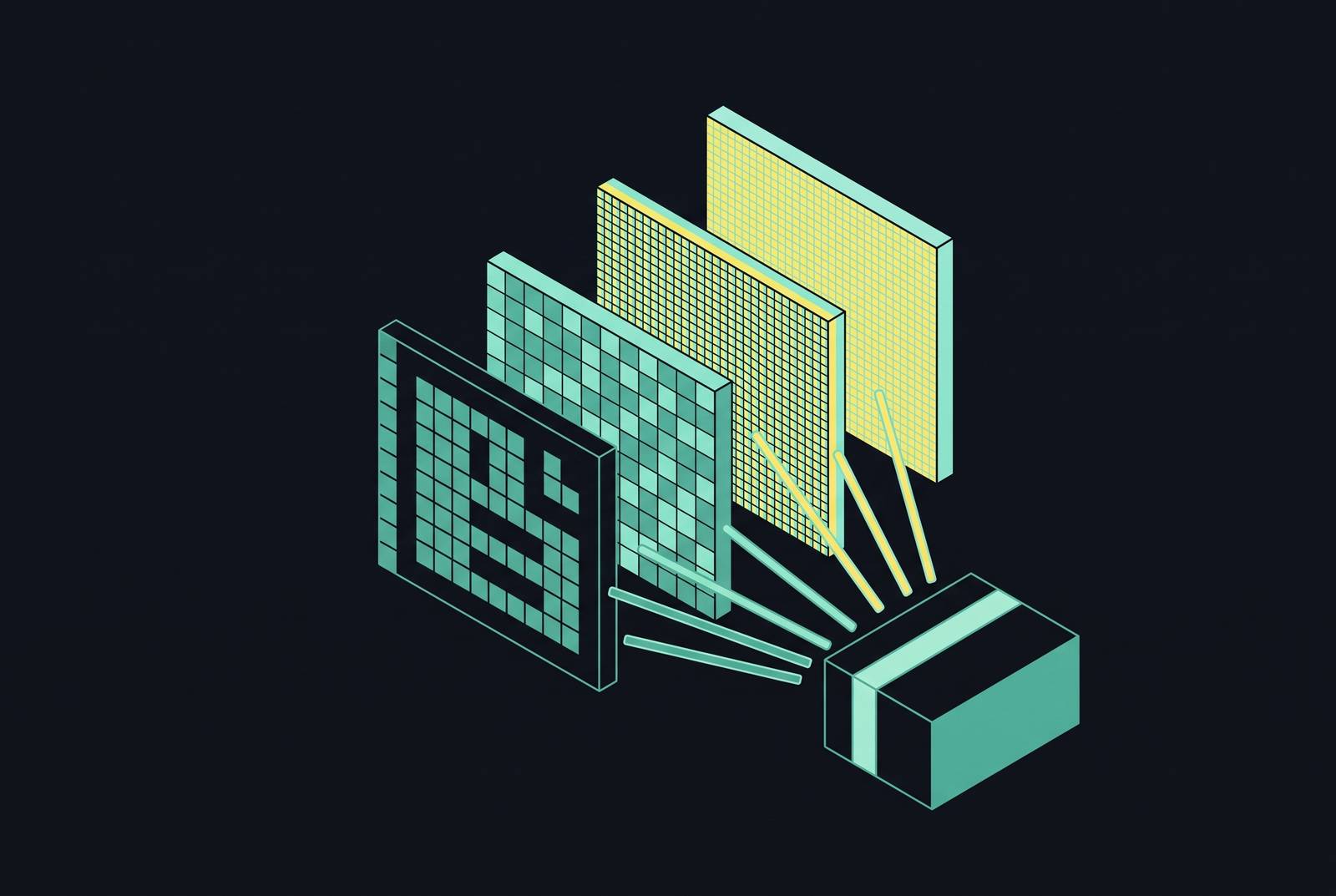
Resolution sets a hard ceiling on OCR accuracy, and the relationship isn't fuzzy: below a certain pixel density, engines can't tell a zero from an O, or an "rn" from an "m," no matter how good the software gets. Most groups handle resolution like any other setting they can fix later. Flipping that order makes more sense. If DPI is off when you capture it, downstream cleverness won't buy a fix. This article lays out the real-world thresholds, the reasons behind them, plus how font size, document type, and mode raise or lower them.
Smarter preprocessing can sharpen contrast, cut noise, or fix skew, yet none of it helps beyond the pixels already captured. A paper in Frontiers in Signal Processing (April 2026) says it flat out: even high-end OCR systems fail when input looks visually rough or structurally rough, so look at the files before OCR, not after. Resolution is also the pipeline's cheapest item to fix. It costs nothing, bumping your scanner up to 300 DPI from 200. The extraction errors caused by skipping that step aren't cheap to fix: they cost staff time, tidy entries, and batches scanned again. This applies to printed documents, scanned sheets, and camera captures plus special-script material rather than a single use case.
What the standard thresholds are and where they come from
In research writing, vendor documentation, plus published benchmarks, one figure appears again and again: 300 DPI. Most references call it the go-to minimum for normal printed text (the LlamaIndex glossary notes it), and it reads more like the accepted low bar.
Under that floor, degradation follows a predictable pattern. Pictures grabbed online or from captures typically sit at 72 DPI up to 150, which is weak for OCR without preprocessing, and once you go under 100 DPI, even that rarely helps. Standard printed text is workable at 300 DPI. Text below 10-point font requires 400 to 600 DPI so letters stay legible down to each pixel. For images in grayscale or color, 150 up to 300 DPI works, since their color data adds information that makes letters easier to distinguish. Because that contrast layer is gone, Black-and-white, bi-tonal images typically demand 300 DPI up through 400 DPI.
The mistake worth outright naming: taking DPI alone as the full picture, when it's a half-measure. Since DPI measures proportion rather than pixel count, a picture with tiny sides might still break down even with big numbers. A small high-DPI scan may store less usable pixels for each character compared to a bigger scan at reduced DPI. Look at both values at once, because a lone DPI figure can mislead you.
Broadcom enterprise OCR guidance sets pixel-level floors DPI by itself does not reveal. For each upper-case Latin character to work reliably, it must be 18 pixels tall or more. The system blocks Images outright if they fall below 200 by 200 pixels or exceed 8,400 by 8,400 pixels, capping any sheet at 8,400 pixels across. They're not accuracy goals. Pass or fail, that's all.
A storage cost is worth naming as well. Any standard paper scanned in bi-tonal at 200 DPI needs roughly 41 kilobytes of space. That climbs to roughly 62 kilobytes at 300 DPI. Small per scan, but the total grows once you're dealing with a document pile in four figures. Put beside the cost to re-scanning and manually correcting bad OCR output, the choice is clear. Cover the storage cost.
How accuracy actually changes as resolution rises: empirical evidence from DPI sweeps
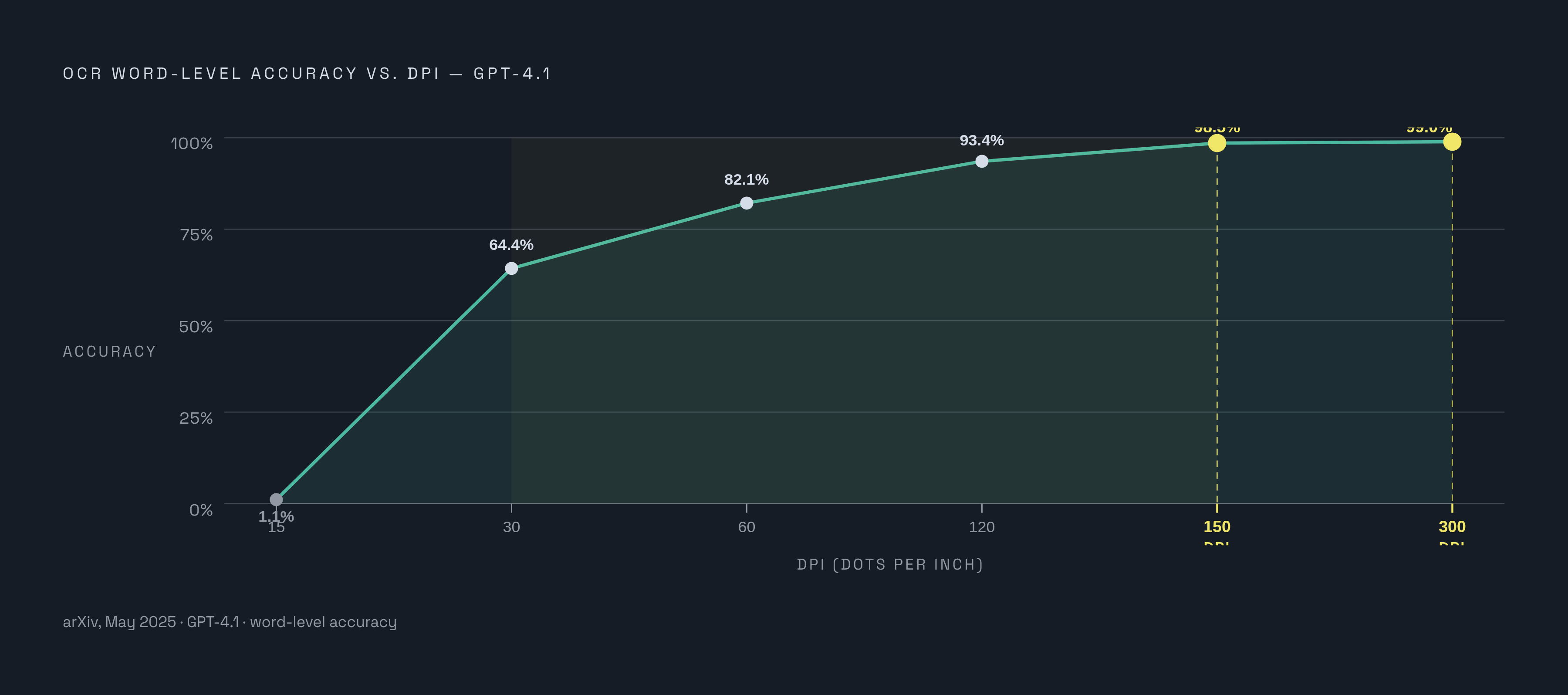
Testing GPT-4.1 across a DPI sweep (May 2025, arXiv) reveals how sharply accuracy climbs as resolution rises. Word-level accuracy was 1.1% for 15 DPI, climbed to 64.4% with 30 DPI, rose to 82.1% for 60 DPI, then 93.4% with 120 DPI, 98.5% for 150 DPI, before it topped at 99.0% with 300 DPI.
How the curve looks overall matters more than where it sits at any one spot. Between 30 and 150 DPI, accuracy climbs almost vertically, gaining roughly 34 percentage points in that narrow band. After 150 DPI, improvements flatten into tiny fractions. Since that graph leveled out near 300 DPI, the figure serves as sufficiency for no reason other than gains stopping there. Using 600 DPI for one printed business letter buys little beyond nothing, and anyone who does it wastes storage plus scan work over a rounding error.
Another ablation run tested how input pixel size shifts accuracy of document pre-training models on RVL-CDIP. Accuracy reached 89.5% at 224 by 224 pixels. Bumping to 512 by 512 raised accuracy, hitting 90.4%. With 960 by 960 inputs, accuracy hit 92.5%. The improvements were gradual, nothing close to that DPI sweep.
Compare both experiments and a trend emerges. Work built on recognition alone, with no nearby text context for help, shifts more as resolution rises than work where words can cover gaps. Resolution matters most where context is unable to fill in, and barely at all where it does.
A repair limit is worth flagging for people handling already-degraded scans. According to arXiv, boosting scans via bicubic upscaling toward 300 DPI ahead of OCR produces excellent results until roughly 150 DPI. Under 150 DPI, the scan no longer holds enough information for reconstructing, and OCR results degrade substantially despite upscaling. That makes 150 DPI the workable floor when input can still be saved. Nothing in software can fix what re-scanning beats.
Where document type shifts the threshold: font size, script, color mode, and source
A 300 DPI figure assumes normal body text in readable size. Under 10-point font, the advice shifts to 400 to 600 DPI, since tiny glyphs at 300 DPI lack enough pixels to keep their form.
Script adds more complexity. Chinese, Japanese, and Korean, or CJK scripts, are denser structurally than Latin writing, cramming extra strokes into a similar footprint. Scanning Twelve-point CJK body text at 300 DPI produces glyphs measuring 48 pixels by 48, which is the suggested size for accurate recognition. At the lower end it's about 30 by 30 pixels, or roughly 7.5-point text scanned at 300 DPI, a bare minimum rather than a practical floor for everyday use. Because each CJK character carries extra fine lines, those scripts require a greater pixel density compared with Latin script.
Color mode plays an equal role. Color or Grayscale images can use 150 to 300 DPI, since added color information lets the system tell background from text even when density of pixel is limited. Without that cushion, Bi-tonal, black-and-white images require 300 DPI for matching accuracy.
Source type introduces distortions that have nothing to do with resolution. Camera captures cause trapezoidal warping, whereas Flatbed scanners tend to create skew and misalignment instead. Camera-based capture, often seen in KYC and identity-verification workflows, adds skew, distortion, and uneven light. Fax documents typically come in at 100 to 200 DPI, with layered halftone marks plus baked horizontal line noise in the file. Discolored documents call for RGB scanning so every detail is captured, and standard OCR engines frequently prove flatly incompatible with material predating 1850, regardless of resolution.
DPI doesn't control how Ink color works. Dark-colored ink against a light page offers the best contrast OCR can get. A scan capturing lots of dots won't save accuracy when colored ink lowers contrast. Typed text from typewriters produces weaker OCR results compared with printed type, and a document that mixes fonts inconsistently makes it harder still.
How resolution interacts with the other quality variables that determine OCR output
A paper in Frontiers in Signal Processing (April 2026) shows sharpness and skew affect OCR results alongside resolution. Resolution lays the groundwork, though the other variables operate by themselves, regardless of the pixels a scan carries. Many pipelines burn time raising DPI when tilt or blur is the real issue, yet the fix involves nothing about pixel count.
Skew stands out as the clearest example. Skew disrupts line segmentation right away. If a scan is skewed, tools like Tesseract plus comparable OCR engines will fail at breaking apart text, causing accuracy to fall sharply. Skew often starts with error during scanning, a person setting a document down crookedly, yet that high-DPI scan from one crooked sheet remains poor input.
The same goes for brightness and for contrast. Overexposed and underexposed scans distort character shapes at any pixel count, while keeping brightness setting close to 50% is usually the right level. A scan captured at any DPI still loses recognition when the text lacks contrast against its background.
Noise can appear in several ways. When JPEG compression introduces color artifacts near character edges, OCR might misread them as letters or use them to obscure actual text. A grimy scanner bed and photo noise create speckling the engine reads as stray marks. A shaky camera or out-of-focus setup causes Blur that softens character edges, leaving them undefined even if the DPI reads as high enough.
First figure out the real issue before choosing a fix. Using upscaling on a picture full of blur or skew wastes your processing and makes the final output look bad.
The preprocessing pipeline that recovers accuracy from suboptimal inputs
Done well, Preprocessing shows measurable gains. In 2025 implementations, Rigorous preprocessing plus optimization dropped Character Error Rate up to 50%, while accuracy rose as much as 15% when specifically handling noisy conditions.
Most pipelines run through the same sequence of steps. Binarization leads, converting images from grayscale to black-and-white so text stands out more sharply against the background. Then Deskewing corrects the tilt, giving line segmentation a real shot; how flat the first scan lands also predicts OCR output. After that, Denoising smooths things out with Gaussian blur to stop grainy speckling getting read as if it were text. Segmentation closes this pipeline through edge work plus contour-finding methods such as OpenCV that isolate real material, remove empty margins and frames, and help the software parse tiny text with tables.
KYC pipelines rely on segmentation, deskewing, and normalization as vital preprocessing steps.
Specifically for low-resolution cases, the advice splits at the previously noted 150 DPI line. Above that line, upscaling through bicubic interpolation to 300 DPI ahead of OCR produces excellent results anyway. Under that mark, a source picture holds too little information for upscaling to fully recover, making re-scanning or re-capturing the better choice.
That still leaves the basic costs the same. In the entire pipeline, Standardizing how you scan at intake is the cheapest option. A scanner's DPI setting costs nothing to tweak. Correcting downstream errors from skipping this step costs way more, if only in worker hours.
What resolution means for multimodal LLM-based OCR, and where the constraints remain
Multimodal models, including GPT-4 Vision, Claude 3.7 Sonnet, Gemini 2.5 Pro, plus PaddleOCR-VL and Qwen2.5-VL, handle text extraction another way compared with OCR engines that are traditional. Instead of classifying single letters through a template, they handle any document in a contextually aware way, like someone glancing toward one smudged term and working it out from nearby text. So they hold an edge versus rule-based systems when the input gets messy.
Even now, Resolution still sets limits, and staying blunt is worth it: moving toward multimodal systems does not allow anyone to ignore that DPI floor. A March 2025 arXiv paper on multimodal LLMs and resolution found these models match conventional OCR performance around 300 ppi, but performance drops off sharply below 150 ppi. The May 2025 GPT-4.1 DPI sweep shows the same thing: even one frontier system manages just 64.4% word-level accuracy with 30 DPI. A smart system can't save heavily degraded input, so pitching the LLM to fix poor scans means you're pushing snake oil. The fall isn't quite as steep as a rule-based pipeline would see.
How smart the system is bears no relation to certain platform-level constraints. That same March 2025 study says Azure's Computer Vision OCR has the minimum resolution at 50 pixels per edge. This floor is strict, not a suggestion.
For accuracy, AI-powered OCR tools usually hit 95% off the shelf, and top 99% after learning from proprietary material for a given use case. Traditional OCR systems typically achieve around 80% accuracy. For handwriting recognition, specifically, Advanced models like Gemini 2.5 Pro posted strong results in 2025 handwriting benchmarks.
Edge deployment brings its own take on this problem. Multimodal models like MiniCPM-Llama3-V 2.5 handle high-resolution images and multiple languages on mobile devices. The resolution thresholds hold steady whether the work happens on a mobile device or in a rack. Those limits hold no matter where processing takes place.
Adopting multimodal LLM pipeline keeps the resolution threshold the same. With stronger input you reach a higher ceiling, but that input must still meet the identical floor.
Where standard thresholds fall short: historical documents, handwriting, and degraded materials
Standard thresholds expect a clean, readable source, and that expectation falls apart quickly with old manuscripts. Traditional OCR struggles with older manuscripts due to degradation, handwriting variability, and shifting font conventions.
In certain situations, Vision-language models are closing the distance, but calling it "closing" overstates things for a few. Humphries et al. (2024) reported character error rates of 5–7% on 18th–19th century English manuscripts. Studies have shown that general-purpose VLMs can outperform traditional OCR with certain historical documents. Levchenko (2025) benchmarked 12 multimodal LLMs on 18th-century Russian material and got encouraging results but also saw genuine error modes: one tendency, termed over-historicisation, happens when the system forces period-specific ideas onto text that is ambiguous.
Here, Purpose-built models now top other general-purpose tools, marking a shift worth backing over larger broad models. Fine-tuned across 155 historical text corpora spanning 46 language clusters, the 3-billion-parameter VLM CHURRO was designed for historical document processing. Focused work with degraded material beats using a larger general-purpose system for the same task. In contrast, GOT-OCR 2.0 folded street text alongside standard documents plus math symbols into one unified system but struggled with historical works specifically, showing that wide range alone won't ensure depth for any tough case.
Errors at this stage reach further than extraction alone. OCR errors in low-quality source documents clearly hurt downstream tasks like information retrieval, finding incidents, picking out people and places, and modeling themes. The garbled transcription isn't merely unsightly in print. A bad transcription ruins every downstream task that depends on it.
Badly degraded, handwritten, or historical material still needs resolution thresholds, but they're no longer enough alone. That DPI floor is the bare minimum. Producing usable output from very challenging source material means fine-tuning or a carefully chosen approach, not just turning up the scan setting.
How accuracy benchmarks translate into output quality expectations by document type
The CER metric, or Character Error Rate, links all of this. This is the figure that reveals, concretely, if a preprocessing and resolution decision really worked on each document type, not just in theory. A well-printed business letter at 12 points, scanned at 300 DPI, should yield CER in the low single digits or better. Even passing a faded 19th-century manuscript through CHURRO, which is fine-tuned for this work, yields a meaningfully worse error rate. That happens not from pipeline trouble, since the source material sets a ceiling no printed document today would.
Resolution thresholds don't draw one pass/fail line for all, and reading them that way is the mistake we should correct here. Calibrated to document type plus script and ink along with source, this setup dictates how much accuracy ceiling stays reachable prior to preprocessing or picking a model.