Preprocessing Pipelines That Improve OCR Output Quality
Sequence matters: preprocessing steps in the wrong order leave OCR stuck between broken and working.
OCR recognizes characters, not meaning. Give it a page scan, and you get plain text, no layout, no clue what the words meant as a whole. Turning that raw string into something usable requires three steps in sequence: image cleanup, engine tuning, and text correction. If you miss a step or do them in the wrong order, the project gets stuck at "good enough to be annoying," which is worse than broken or working, since no one knows whether to keep fixing it or scrap it.
Even clean-looking scans can introduce unwanted artifacts like mid-line word breaks, merged tokens, missing punctuation, and tables reduced to unreadable text. The issues don't announce themselves either. Downstream NLP models don't error out on garbage; they just quietly give worse predictions. Names broken across lines get missed by entity recognition. These models latch onto junk words that don’t matter. Key-value forms break down and become a block of text no one can search. Standard documents have error rates from 1% to 5%, which seems okay until things get more complicated.
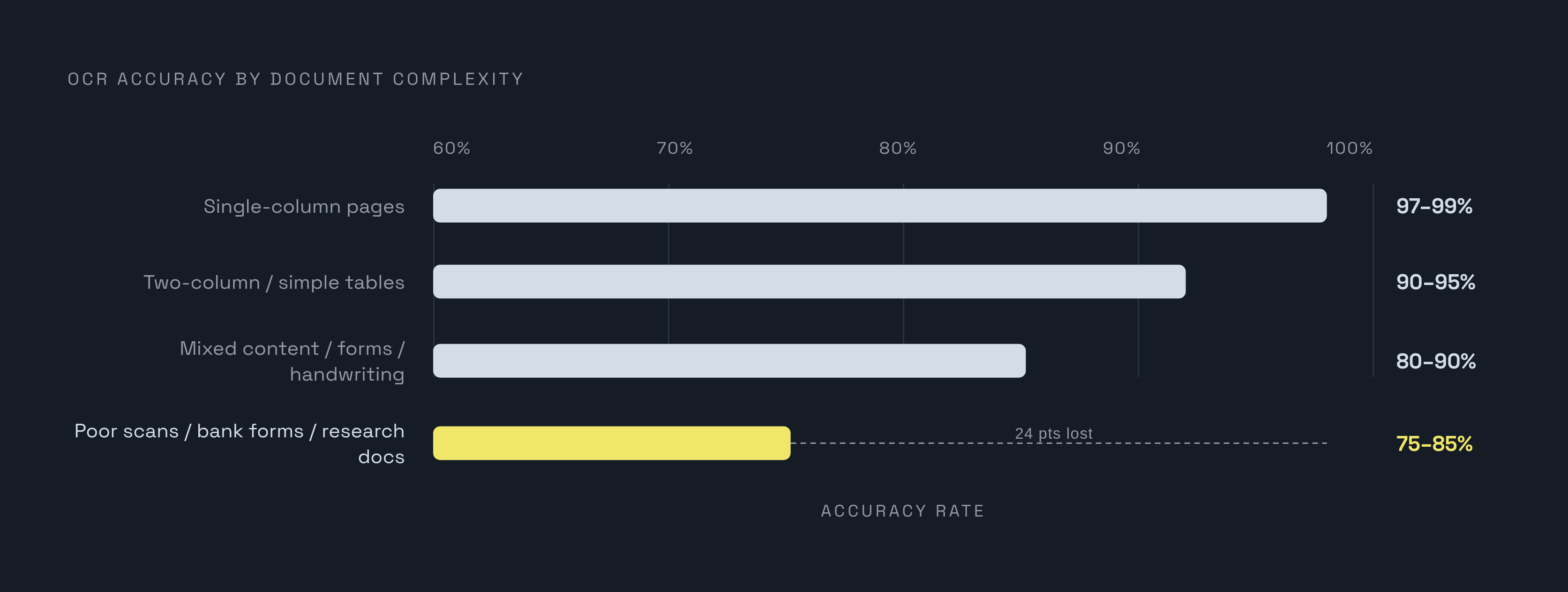
Things quickly become more complicated. Single-column pages usually hit 97 to 99% accuracy. Add two columns or a simple table, and accuracy falls to 90–95%. Mixed content, forms, handwriting, several languages on one page: 80 to 90%. Poor scans, bank forms, or packed research docs hit 75–85% right off the bat. The gap between 80% and 99% is not a short walk. According to the OCR Solution State 2025 report, cost and effort grow exponentially as accuracy goals rise, not linearly. A sequenced pipeline outperforms any single clever trick because no single fix can bridge that gap alone.
How image-level problems translate into recognition errors, and why they must be fixed first
OCR engines see pixels, not what you meant. All pixel-level damage flows directly into character recognition, and no later text correction completely fixes a character misread because the engine started with a poor image. Start with fixing the image. It all relies on it downstream, and nothing later can fix the damage.
Most of the damage comes from just a few types. Even a slight skew from a scanner feed distorts characters, breaking line segmentation. Noise appears as extra punctuation or random marks not originally on the page. Text fades into the background with low contrast or uneven lighting, making characters disappear. Low resolution blurs fine details, making similar characters, like lowercase l and 1, or O and 0, impossible to tell apart. Old documents often combine all these issues at once: blur, ink bleed, decades of aging artifacts, all on one page.
Preprocessing comes first, before tuning the engine or fixing text, since the system reads only what’s in the picture. According to a 2025 study in Frontiers in Artificial Intelligence, recognition accuracy for misaligned, overlapping text without preprocessing was markedly low on one benchmark. That's the floor the next section climbs off of.
The core image preprocessing steps and what each one actually fixes
Resolution is the starting point. OCR work usually needs at least 300 DPI, but systems aiming for better accuracy often capture at 400 to 600 DPI. This presents a clear compromise: more processing time for higher resolution, worse accuracy for lower resolution, though bicubic interpolation can retrieve some detail from low-res images.
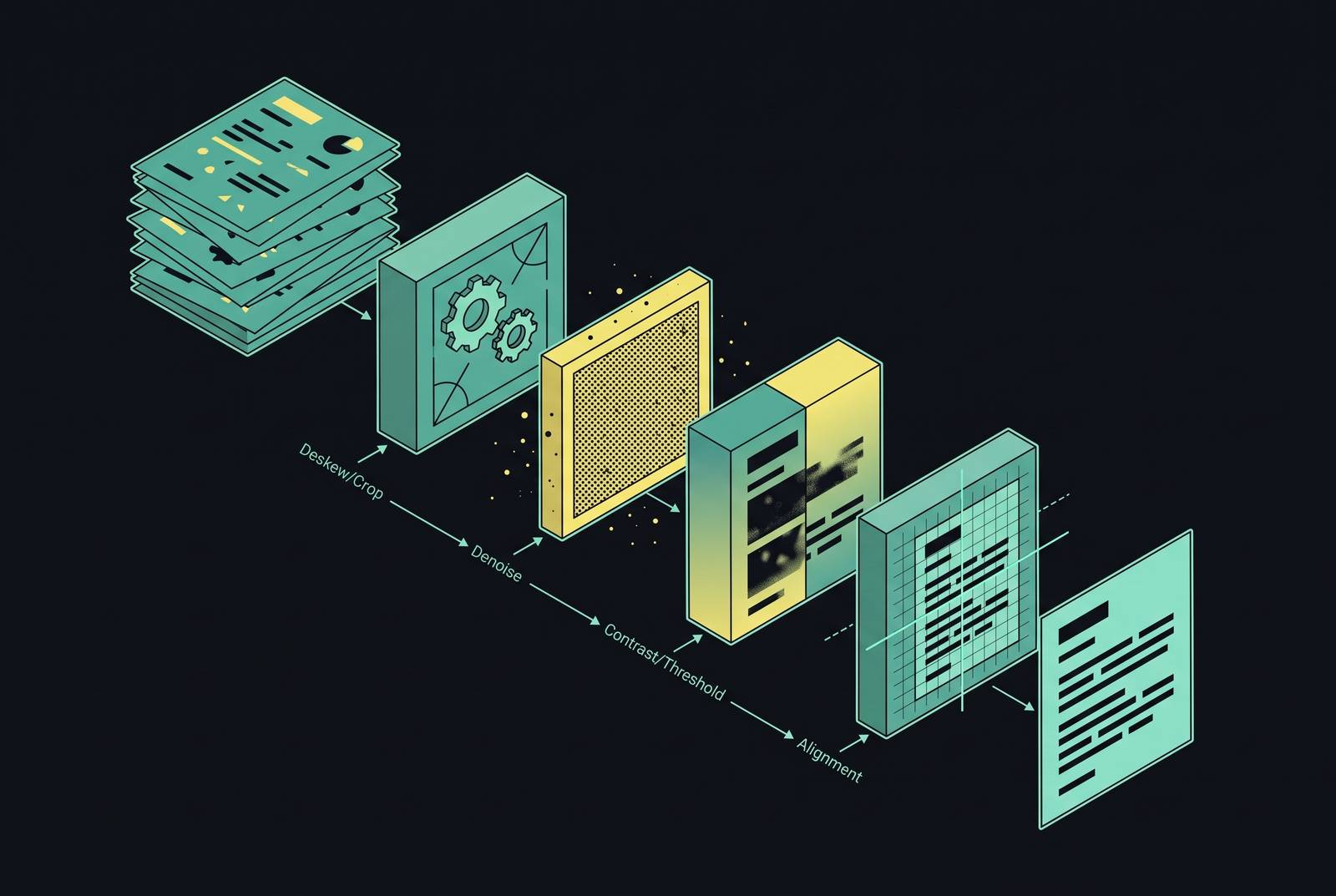
Normalization and contrast boosting often occur before binarization. It smooths brightness differences so glare or shade won’t mess up what follows, and sharpens text against its backdrop before turning everything black or white.
Binarization, which converts images from grayscale to black-and-white, is the most critical step. Ignoring it until later is a common error in the process, and it’s the step to nail before moving on to anything more complex. Global thresholding (Otsu's method) uses one threshold for the whole grayscale image, which works quickly on evenly lit pages. Adaptive thresholding sets unique thresholds for each region of an image of an image, effectively managing uneven lighting, making it the go-to choice for inconsistently scanned documents. A 2023 MDPI study showed Tesseract scored just 27.63 on the Levenshtein distance without preprocessing, with binarization identified as the top factor in reducing that error. Deep learning binarization methods also exist now, for documents too degraded for classical methods to clean. A heads-up: overdoing it erases all the accents. Instances have been reported where ImageMagick denoising removed diacritics in French, an error that seems minor until OCR is done on a document with diacritics.
Deskewing corrects image tilt. A slight tilt from scanning warps letters and messes up line detection, so we find the text angle (using edge detection and a Hough transform) and straighten the image. Binarization may come first because a black-and-white image makes it simpler to spot the correct text angle.
Denoising has traditional and learned methods. Old-school techniques rely on histogram tweaks, contrast boosts, and shape-based filters. Deep learning methods rely on autoencoders that shrink the image and rebuild it, cutting noise but keeping the real text details. Denoising strength must suit the document either way. Overdoing denoising can remove diacritics and thin strokes along with the noise.
Morphological operations, dilation, erosion, skeletonization, clean up border noise and irregular character shapes. The MDPI study showed that minor steps like straightening and morphological cleanup improved results, and removing any step hurt performance. All these techniques aim to give the OCR engine an image like those it saw during training.
Why there is no universal preprocessing sequence, and how to choose the right one
No one pipeline works best for every document type, and the preprocessing research says this clearly. Two factors cause the differences. Document content and OCR engines both vary: a historical manuscript, a financial form, and a multilingual scan all degrade differently. Different OCR engines handle input flaws in unique ways, meaning a solution beneficial for Tesseract could be ineffective or even detrimental for a transformer-based model.
A documented pipeline may adjust local brightness and contrast, convert to optimized greyscale, apply Unsharp Masking, and perform global binarization, in sequence. Even this "classic" set of steps is done in a specific order, not just randomly. Pause for a moment: if experts still arrange these steps deliberately, then treating them as random filters means you're already at a disadvantage.
So how does a practitioner actually decide what to run? Most of the work is done by a few questions. Is the lighting consistent across the page, or uneven? If lighting varies, choose adaptive thresholding instead of global. Does the document have accents or thin lines that a strong denoiser might remove? If so, calibrate conservatively. Is the resolution sufficient so that upscaling provides no benefit? Don't do it; focus on binarization and deskew. What engine will be reading the output? Ignoring an engine's specific preprocessed input preferences causes teams to optimize for the wrong target.
None of this functions as a rigid checklist. It’s more like testing a hypothesis on a real, representative sample of the actual documents, not blindly applying it and crossing your fingers.
Layout analysis and segmentation as a distinct pipeline stage, not a preprocessing detail
Layout analysis figures out the shape of the page before any character gets read: where the text blocks sit, where the headings are, which regions are tables, which are captions, which are images. Treating this as part of preprocessing is wrong, and widespread, because it serves a completely different purpose. It tidies up what’s on the page already. Layout analysis figures out what the page even is.
Zone boundaries that are wrong have obvious consequences. Words are cut in two at a column edge. Segmentation errors cause entire regions to be overlooked. Reading multi-column pages out of order messes up the meaning, even if all words are right. Tables turned into a single line of text can't be understood by any NLP system that needs to interpret them.
Research shows these pipelines usually add two steps before OCR: one splits the page into meaningful zones, the other picks out each line inside them. The OCR engine then works on input that's ordered and segmented, not a raw, undissected page.
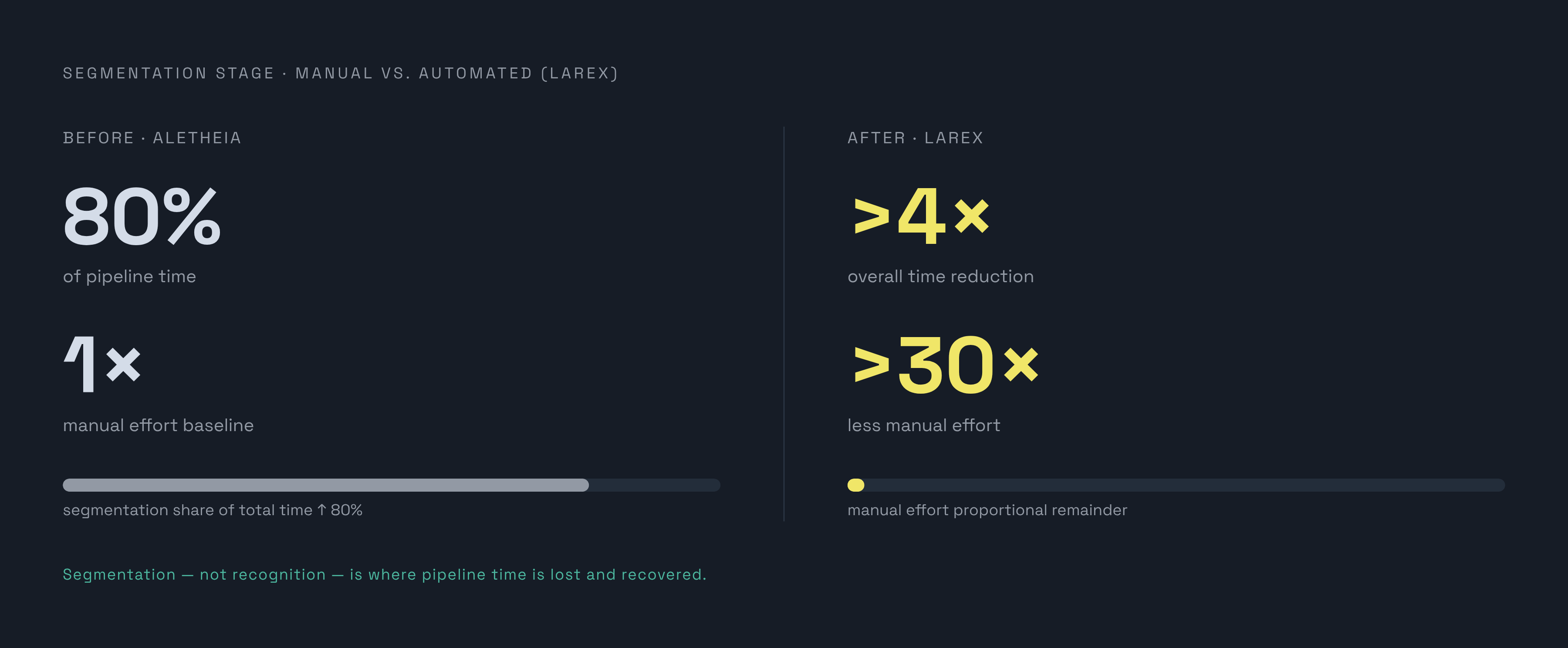
Zonal OCR improves on this by focusing on certain parts of a document instead of scanning the entire page randomly. In 2024, IDC Research found this method achieves 99% accuracy on structured documents, processing over 2.3 billion documents yearly across industries. Most time actually goes into segmentation, not recognition. Manual segmentation with the tool Aletheia took 80% of total processing time in one documented workflow. Switching to the automated tool LAREX cut overall time by more than 4x and cut manual effort specifically by more than 30x. This isn't a small efficiency boost; it's the central argument here: segmentation, not image cleanup, drives the biggest pipeline improvements and is likely the most overlooked part.
Deep learning-based image restoration as a preprocessing layer for degraded documents
Classical preprocessing follows rules that are hand-coded: certain thresholds are applied, and specific rotations are used. Deep learning restoration operates in another way. It learns directly from data how to map degraded images to clean ones, without needing hand-coded rules.
Several models address this, each designed for a specific type of degradation. CNNs manage denoising, enhancement, and super-resolution by using their ability to detect local details. Autoencoders shrink a noisy image and rebuild it cleaner, reducing clutter without manual tuning. GANs and attention mechanisms target the finer details of character structure. Transformers look at the entire image together, helping when damage isn’t just in one spot but affects how the page is arranged. Diffusion models like DiffIR and ResShift get closer to the real distribution of a clean image than earlier generative methods did, making them well-suited for badly degraded historical material.
A 2025 review notes, the benefit over traditional methods is that the model figures out the difference between a character and its background from big datasets, instead of relying on a person to code that difference. The catch is training data. Genuine degraded documents paired with clean versions are uncommon, so researchers mostly use synthetic degradation: clean text gets noise, blurring, lower resolution, stains, morphological changes, and then becomes training data.
This doesn't replace traditional preprocessing in most current production systems. It complements it, especially helpful for historical archives and documents with severe, varied degradation on one page.
Post-OCR text correction as the third stage, what it fixes that image preprocessing cannot
Restoring images sharpens the letters. It can’t fix every recognition error, especially when the material is so damaged that restoration loses the signal before it finishes trying.
Post-OCR correction continues from that point. Post-OCR correction addresses persistent substitution errors that image cleanup fails to correct, such as common substitution errors like similar-looking characters. It addresses fragmented words. And it catches something image cleanup cannot touch by design: words that look correct and are legible, but are wrong given their context.
Different approaches cost you cash or hurt precision if you choose the wrong one. Dictionary-based correction works quickly and fixes frequent substitution mistakes, but fails when encountering terms not in general dictionaries. Context-aware NLP validation helps choose corrections, catching errors a dictionary lookup completely misses. ByT5 and similar models, trained on fake OCR mistakes, focus more on meaning, and they work well with old texts in many languages. LLM-based correction enhances context understanding, manages unfamiliar documents with minimal training, and incorporates layout awareness, though it comes at greater expense and potential than simpler approaches.
Task breakdown is key, and avoiding step three doesn't save time. It simply shifts the problem later. Character shapes get clearer with image fixes. Post-correction resolves systematic recognition errors through something closer to sequence-level translation. They don't do each other's job. If you skip this stage, you get the same problems mentioned at the start: downstream issues like overfitting on noisy tokens or missing key information that weren’t caught earlier.
What PreP-OCR demonstrates about combining all three stages into one sequenced pipeline
PreP-OCR combines image restoration and post-OCR correction in two steps, created by researchers from multiple universities and published in ACL 2025. It's a useful case study precisely because it doesn't try to solve the problem with one clever step. It orders two, and that ordering is vital.
The first stage fixes the image. It learns from fake examples: spotless text in different fonts and setups, then messed up with random speckles, blur, lower quality, scratch-like lines, blotches, and shape tweaks. It uses a multi-directional patch extraction and fusion strategy to process large page images efficiently. The result is a clearer page image with most of the character-shape confusion removed.
In stage two, ByT5, fine-tuned on synthetic historical text pairs, is used to correct any remaining recognition errors after restoration. The model works on English, French, and Spanish historical texts.
On 13,831 pages of real historical documents, the full pipeline reduced character errors by 63.9 to 70.3% versus OCR on unprocessed images. The range shows the whole point in brief: restoration alone can't fully reduce errors, nor can correction. Cleaning removes visual clutter first, then correction handles the rest, neither step works as well without the other. The full sequence combines image preprocessing and post-OCR correction. Miss one step, and the process doesn't become easier. It simply shifts the issue elsewhere, leaving it for others to uncover.
Sources
- OCR Solution State 2025. OCR Rebuilt for the AI Era | by Xin Cheng | Medium
- PreP-OCR: A Complete Pipeline forDocument Image Restoration and Enhanced OCR Accuracy
- Enhancing OCR Quality with Advanced Techniques
- PreP-OCR: A Complete Pipeline for Document Image Restoration and Enhanced OCR Accuracy
- Optimization of Tesseract OCR for Automatic Text Extraction on Indonesian ID Cards (KTP) Through Image Quality Enhancement Using Preprocessing Techniques
- frontiersin.org